AI message drafts on WhatsApp: you press Send
Hyv opens a contact's WhatsApp chat with your message already typed in. You can edit it, send it or close it. Hyv never messages them itself.
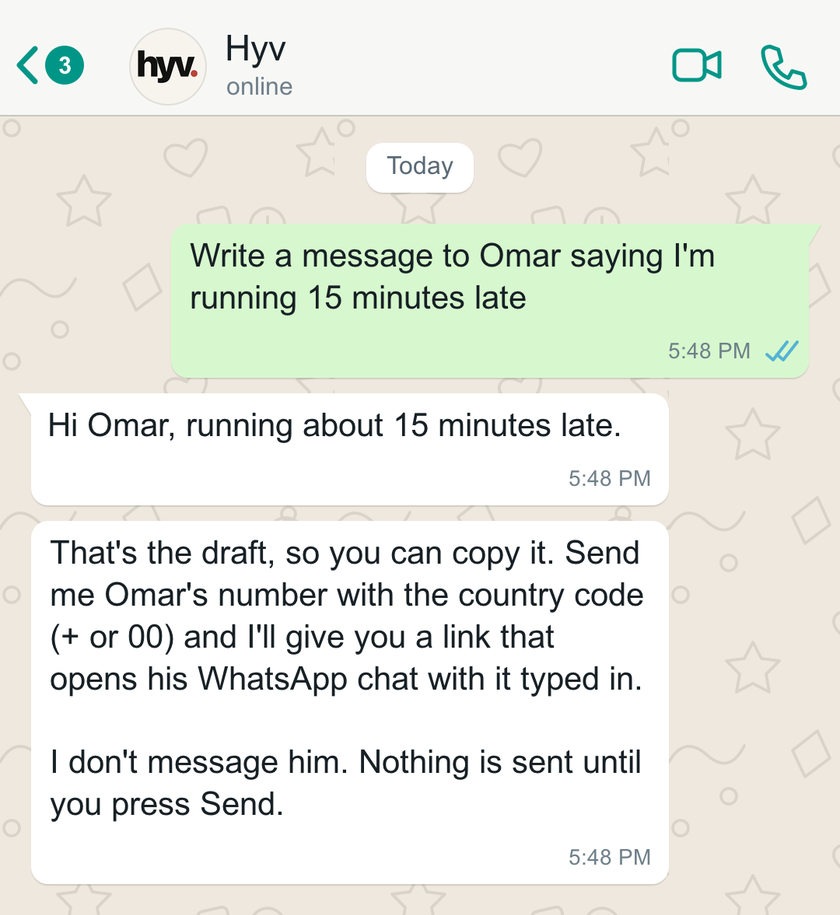
When you ask Hyv to write a message to someone and give their number, it sends you the draft and a link that opens that person's WhatsApp chat with the draft typed in. You can edit it, send it or close it. Hyv never messages the contact, and nothing is sent until you press Send.
What Hyv sends you
When you ask Hyv to draft a message and give the person’s phone number, Hyv sends you two things:
- The draft on its own, so it is still easy to copy.
- A link that opens your chat with that number with the draft typed in, and a reminder that nothing is sent until you press Send.
Tapping the link opens that person’s WhatsApp chat with the draft already in the message box. You can edit it, send it, or close it. Hyv does not message the contact, and nothing leaves your phone until you press Send yourself.
How it works, plainly
- The number needs a country code, written with + or 00. If it does not have one, Hyv asks which country rather than guessing.
- It only uses a number you typed in that request. People in your trusted circles stay private: Hyv never sees their numbers, so it cannot build a link for them.
- It works in your private chat with Hyv, on WhatsApp or on Telegram. The link opens WhatsApp either way.
- It does not work in group chats, so a number is never shown to a group.
- Drafts can be up to 1,000 characters. If a draft is too long to fit in a link, Hyv sends it as a normal reply for you to copy. On Telegram the link limit is lower, so long drafts in some scripts may come as a normal reply too.
- Emoji, line breaks, punctuation and non-Latin scripts such as Hindi carry over as written.
Why it is built this way
Hyv drafts, you decide. Writing into other people’s chats on your behalf is not something Hyv does, and this feature does not change that. It removes the copy and paste, and leaves the final step with you. The link is built by Hyv’s own system, not written freely by the AI, so it can only ever point to the number you gave and the text you saw.
Guide: How to never forget a birthday on WhatsApp.
Questions
Does it work from Telegram?
Yes, from your private chat with Hyv on either app. The link opens WhatsApp.
How long can a draft be?
Up to 1,000 characters. A draft too long for a link comes as a normal reply for you to copy.
Does Hyv ever send the message for me?
No. Hyv does not message the contact. Nothing leaves your phone until you press Send yourself.
What if the number has no country code?
Hyv asks which country rather than guessing. Write the number with + or 00 to skip the question.
Can I make a link like this without Hyv?
Yes. Our free WhatsApp link generator builds one from a number and a message you type in.
Private by default. Consent before people. Restraint before action.
Hyv is invite-only for now.
Ask for an invite and we will set you up.
More from Insights · Add Hyv as a preferred source on Google · Also on Substack